

The Google Ads audit checklist for 2027 is here. And it includes over 40 areas to review that will help improve your campaigns and boost your return on ad spend.
It’s important to regularly audit your Google Ads account to get the best results from it. And although that may sound like a lot of work that you have little time to commit to, the Google Ads audit checklist for 2027 helps make your work easier.
It focuses on the main areas that will help you see quick results and maintain high performance.
And AI and automation has made this even more important. But, as powerful as these tools are, they often make errors when not checked and this can affect the performance of your ads.
However, the Google Ads audit checklist for 2027 helps eliminate that, including improving poor account structure and incorrect settings that can waste advertising budgets.
So, you should not assume that your campaigns are performing optimally simply because they are generating clicks or conversions. You need to review them.
This Google Ads audit checklist 2027 covers key areas like campaigns, keywords, ads, conversions, bidding, landing pages, budgets and overall performance.
And you will also get a free download below for a Google Ads audit checklist scoring system that you can use to score your campaigns.
Let’s get started:
Campaign Audit
How are campaigns structured?
Aim to structure campaigns by products or services or even locations. And that includes new campaigns you create
Are campaign budgets sufficient?
Check impression share reports at the campaign level to see what percentage of traffic you are getting, and then increase when there is room to improve.

Are campaign names descriptive and consistent?
This is important especially if multiple people will manage your account and as you add more campaigns so you know what they represent.
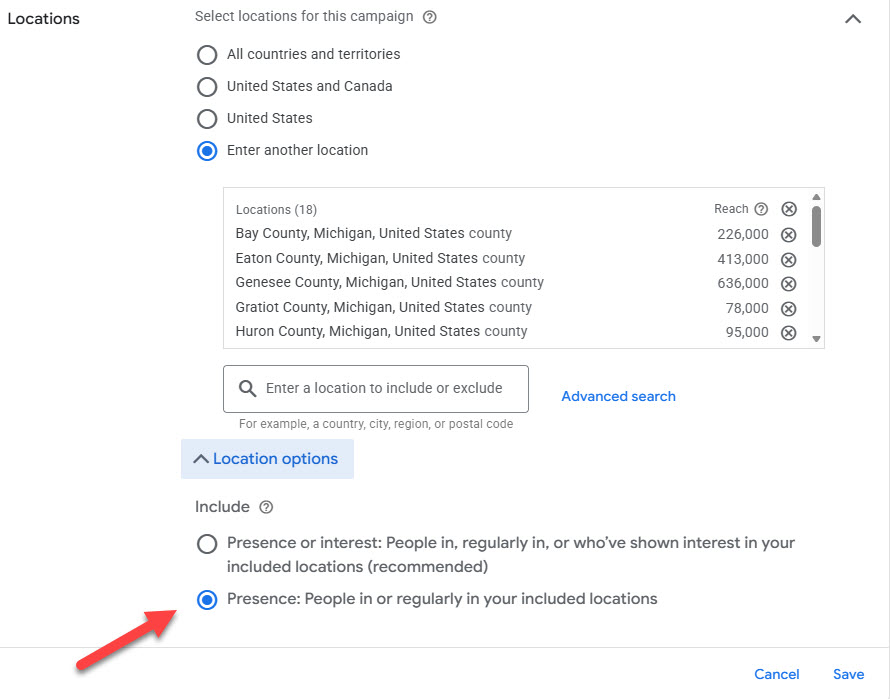
Are location targeting settings correct?
Make sure you are targeting the right locations and not getting traffic from outside your locations. Change the Location Options feature to people who are in your locations.
Are there duplicate or unnecessary campaigns?
Pause or remove any campaigns that are duplicates of others. They affect the performance of your main campaigns.
Are brand and non-brand campaigns separated where appropriate?
This is best practice and helps you to plan your ads effectively based on user profiles and intent – and also allocate budget accordingly.
Are ad schedules aligned with business operating hours?
It’s good practice to run ads 24/7 at the beginning. But you should review this and change it to the best days and hours and also when your business is open.

Have you reviewed device settings?
Check how your campaigns are performing mobile, desktop and tablet devices. And block any that have very low performance, like poor conversions.

>>Get your Free Google Ads Audit Checklist Scoring Guide Here<<
Keyword Audit
Have you conducted keyword research?
Use the Keyword Planner tool in Google Ads or another tool to find new keywords to add to your account that are relevant.

How many keywords per ad group?
Maintain between five to 15 targeted keywords in each ad group. This keeps your ad groups tightly themed and targeted.
Have you added negative keywords?
Add negative keywords to block searches that are not relevant for your business. This will improve the performance of your ads as you target only relevant searches.
Do you have expensive keywords or search terms?
If keywords or search terms are expensive and bringing in poor results or none at all, then you should consider culling them. Or look to improve performance by reviewing other areas like landing pages.
Are you using the correct keyword match types?
There are three main matches types: broad, phrase and exact match. When you first launch a campaign, avoid using broad match and use the others instead. That helps to control the searches you get as you build the fourth match type: negative keyword match.
Ad Audit
Do you have ads in the old formats?
Surprisingly, many campaigns still have standard and expanded text ads running. These old formats underperform and it is better to switch to responsive search ads.
Do ads clearly communicate the products or services?
The ads should be highly specific to the products or services that you are promoting. And include any relevant benefits and a call to action like Buy Now, for example.
Have you added ad assets?
Make sure you add assets are relevant for your ads at the campaign and ad group levels. These should include sitelinks, callouts, structured snippets and call extensions.

Are ads reviewed for outdated offers or messaging?
It’s common for offers and messages to run beyond their end date. It’s easy for advertisers to ignore them, but this affects performance and a notable decline happens after a while.
Are sitelinks pointing to the correct pages?
Any broken links present a poor experience for your users. And this costs you money because when visitors click, Google still charges you the usual cost per click.
Are headlines relevant to target keywords?
Ad headlines should be highly targeted to keywords. And one of the best ways to make that possible is to add the main keywords in the headlines. This helps to boost click through rates.

Are the main selling points included?
Selling points help to highlight your ads and drive more clicks. And this helps to increase conversions.
Are you sending users to the right pages?
To create a great user experience and achieve your campaign goals, it’s important to send users to the right pages. Don’t let them wonder around your website looking for what they searched for.
Are you using all headlines and descriptions?
This is not always necessary especially if you have already your main benefits, features, calls to actions, keywords and so on. However, responsive search ads often work better when you have used all 15 headlines and four descriptions in the ad.
How many ads in an ad group?
Before responsive search ads, it was good practice to have at least two expended text ads, to test them. But now, one responsive search ad is sufficient because of the many headlines and descriptions that the algorithm can test. But you can add up to three active ad groups in an ad group.
>>Get your Free Google Ads Audit Checklist Scoring Guide Here<<
Conversion Audit
Has conversion tracking been installed correctly?
Check that your leads, sales, forms etc are tracking correctly on the Conversion page. Doing this helps you to know which campaigns are performing and which aren’t for effective optimization.

Have you installed Google Tag Manager?
GTM is a powerful tool that takes your tracking to the next level. It’s an advanced tool with a bit of a learning curve, but has the best tracking capabilities to see how your ads are performing.
Is call tracking working correctly?
If calls are important for your business, especially if you are a service-based business, then you should make sure call tracking is working. Check Assets in your campaign to see if the call extension has been added and you are getting traffic.
Are duplicate conversions being recorded?
Check your Goals page to see what conversions are being tracked. And if you see any that you don’t understand or look like duplicates, then remove them and ensure you are tracking correctly.

Bidding Audit
Are you using the best bid strategy for your campaign?
Bidding is a core feature of Google Ads advertising. So, making sure you are using the best bid strategy is crucial. There are automated and manual bid strategies, and it’s important to test them over the lifetime of your campaign.

Is Target CPA realistic?
Sometimes Google will make a recommendation for a target cost per action for your campaign, but this may not be realistic. So, whether it’s a recommendation from Google or it’s your own choice, make sure it is realistic and will not affect the campaign performance.

Landing Page Audit
Are landing pages optimised for Google Ads?
It’s not enough to drive quality search traffic to your website or landing pages. You need to make sure those pages are optimised and have everything in there that your ads promised
Does the landing page or website load quickly?
Slow loading pages present a poor user experience. And they get quickly penalized by the search engines. So, much sure your pages load quickly, in under 2 seconds and use the PageSpeed Insights tool provided by Google to check yours.
Are contact forms easy to complete?
If contact forms ask for too much information, then conversion rates will be low. So, only ask for the most necessary information and make the fields as clear as possible to understand.
Are testimonials, reviews and case studies displayed and prominent?
This is social proof, and it will go a long way in making your Google Ads campaigns effective. Place them prominently in the menu and on landing pages, where they are easily visible.
Are landing page conversion rates being monitored?
Check conversion rates for all pages you are driving traffic to. And based on performance adjust the content or use new pages and test them to see which work best until you get good conversion rates above 5%.
Is the main call to action immediately visible?
The call to action should be mentioned in your ads and should also be immediately visible on the landing page. That means it should be above-the-fold and instantly visible to your visitors when they land on the page.
Is the conversion journey straightforward?
Can visitors easily make their way through your checkout process without getting confused? Is it too long and frustrating for visitors? Test your checkout system and any submission forms you have to make it easy for your visitors.
>>Get your Free Google Ads Audit Checklist Scoring Guide Here<<
Performance Audit
Have you linked Google Ads and Google Analytics?
Analytics (GA4) is a powerful tracking and reporting platform that helps you to optimise your campaigns effectively. And it helps you to see how your Google traffic is performing against other traffic sources.
Have you run some Experiments in Google Ads?
The Experiments tools in Google Ads are powerful and they are a great improvement from prior tools. Use them to test bid strategies, text ads, campaign types, keywords and much more in your account.
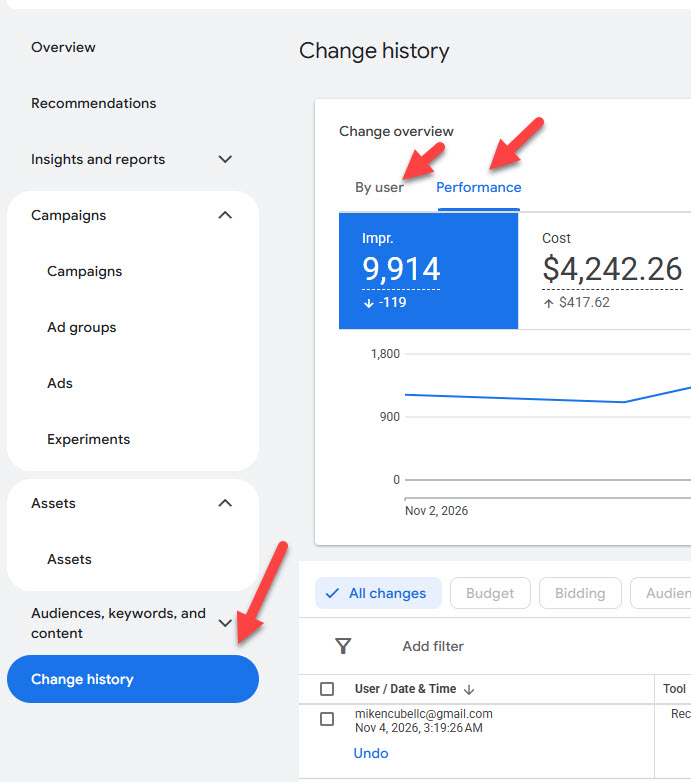
Are your campaigns being actively managed?
Check the Change History report to see if changes and updates are being made to your campaigns, whether by someone in your team or an external Google Ads consultant. And check if automated updates are being implemented if they have been turned on in Recommendations.
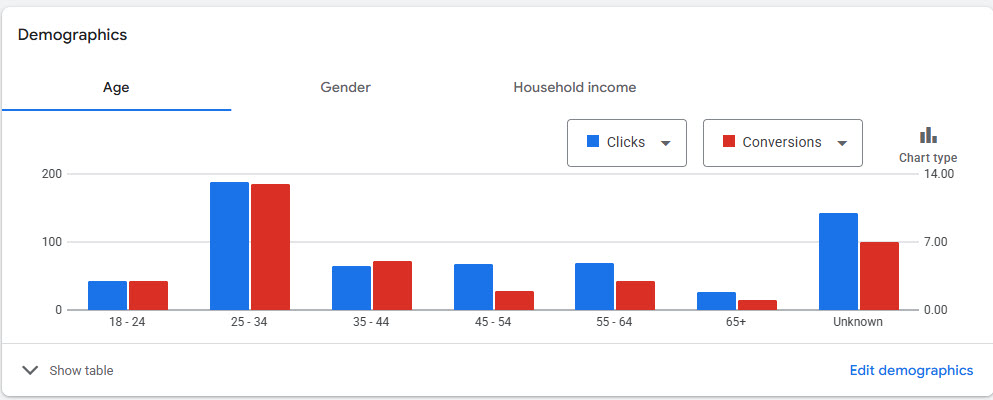
Are demographic insights being reviewed?
Have you checked demographics like gender, age and household income to see how your ads are performing for different groups? Doing so helps you to choose which to target and which to block based on results.
What do your key metrics look like?
These include conversion metrics, click through rate and others that are important to your business. Keep track of these each month or weekly and create a strategy to improve them.
How are AI tools and features working for your account?
Are you using AI Max, Performance Max, Demand Gen and others? Are you keeping track of their performance? What searches are they driving and which platforms are your ads appearing on? What conversion rates are you achieving? All these are important to see how AI marketing is working for your business.
Budget Audit
Are campaigns limited by budget?
If your campaigns are limited because of budget, then you should review this and first assess the recommendation in your Google Ads campaign. If it’s likely to improve performance, then you should considering increasing it.
Are budgets allocated to the best-performing campaigns?
Budgets are set at the campaign level, so if you have multiple campaigns then you will have a budget for each, unless you are using a shared budget. So, check that each campaign is using its budget effectively.
Is it time to increase your Google Ads budget?
Check if it makes sense to increase your budget. This can be important if competitors are becoming more aggressive, or you have seen positive results, or it’s a busy season like Christmas, or you want to launch new products or services. Whatever the reason it may be necessary to increase it even temporarily.
Google Ads Audit Scoring Guide
This Google Ads audit checklist guide for 2027 is only useful if you will take action.
So, I’ve included below a basic scoring example that you can use to check how your account is performing in all these areas.
This is a subjective scoring system, but it will help you to see where you are doing well and what needs improving when you’ve gone through the Google Ads audit checklist for 2027:
>>Get your Free Google Ads Audit Checklist Scoring Guide Here<<
FAQs
What is a Google Ads audit?
A Google Ads audit is an in-depth analysis of an account and campaigns to find opportunities to fix and improve performance.
It often involves a Google Ads specialist who has access to the account and uses tools, resources and their knowledge to analyze the campaigns and then creates a report with recommendations.
What are your Google Ads audit fees?
I offer a free Google Ads review to analyze your account and then I will send you a proposal to fix any issues and improve performance.
However, for a full in-depth and comprehensive audit with insights and recommendations, my fee starts from $450. And the cost depends on the size of your account and campiagns
Contact me for a proposal and quote.
Can you help me implement the insights from the Google Ads audit?
Yes if you need help with updating your campaigns after the audit, I would be happy to do so.
I will send you a quote for that and let you know how long it will take.
How long does a Google Ads audit take?
A Google Ads audit takes about 2-3 to complete. And at the end of that I will send you a report with my recommendations.
Can I audit my own Google Ads account?
Yes, and it is something you should consider doing regularly. And the Google Ads audit checklist above will help you do that yourself.
However, if you have little experience with auditing your account, then you should hire a Google Ads expert who will carry out an effective one for you.
Should I hire a Google Ads specialist to audit my account?
A Google Ads specialist has many years experience setting up and managing campaigns, and they will have audited thousands of campaigns over the years.
So, it’s a benefit to hire a specialist who will bring their expertise to help identify the issues and improve performance for you.
But check their credentials to make sure they have experience. Check case studies and reviews and confirm that they are the right person to help your business.
Get in Touch
Enjoyed the Google Ads audit checklist for 2027, but still need help?
Get a professional Google Ads audit from Mike Ncube. Request your audit below:


0 Comments