
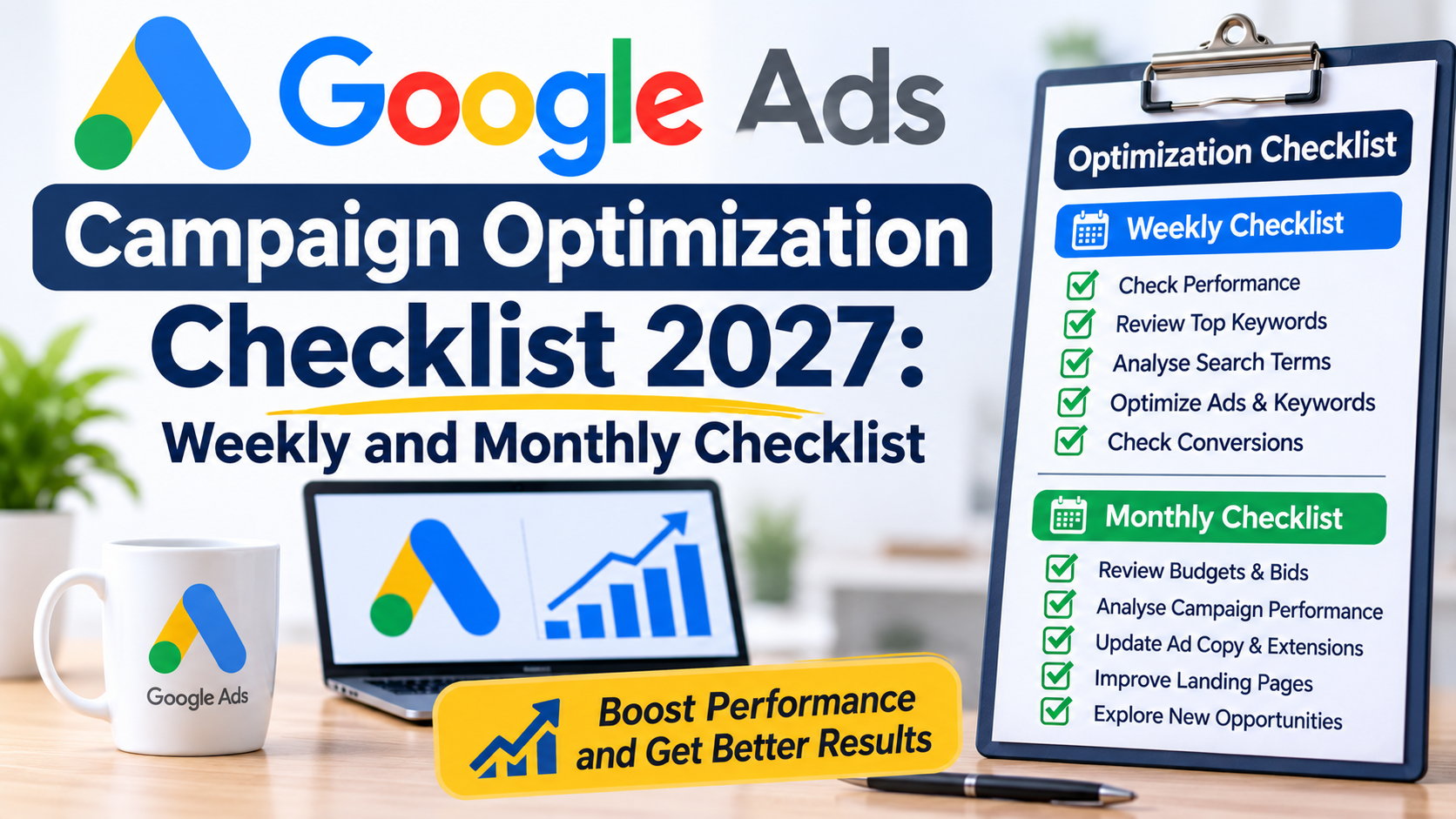
The Google Ads campaign optimization checklist for 2027 is here and is packed full of ideas for weekly and monthly checks to help improve your account.
The main point to know is that Google Ads optimization isn’t a one-off activity. It’s a continuous weekly and monthly process to review data, identify opportunities, fix problems and improve your results.
So, this Google Ads campaign optimization checklist goes beyond just launching a new campaign.
It includes what you should check in Google every week and month. And reveals what activities have the biggest impact on campaign performance.
There are many more features to check, but I’ve listed here the main ones to help you get the quickest and best results.
SECTION 1: Weekly Google Ads Campaign Optimization Checklist
The weekly Google Ads campaign optimization checklist includes the most important actions. These help to keep your campaign on track to achieve your goals.
Review campaign performance
- Compare performance against the previous week – check how your campaign performed between last week and the previous week. And check important metrics like clicks, click through rate (CTR) and conversion rate.
- Identify campaigns that are spending money but not generating conversions – if you have several campaigns, then check which are not performing and review them to find out the cause. And then make changes.
- Look for sudden changes in traffic or performance – have there been any changes in performance? Are clicks and conversions down or up? Could this be seasonal or are there other factors? Doing a weekly comparison will help and then you can investigate why.
Review the search terms report
- Identify irrelevant search terms – check this report weekly or or as often as possible to check for searches that are not relevant and then add them as negative keywords.
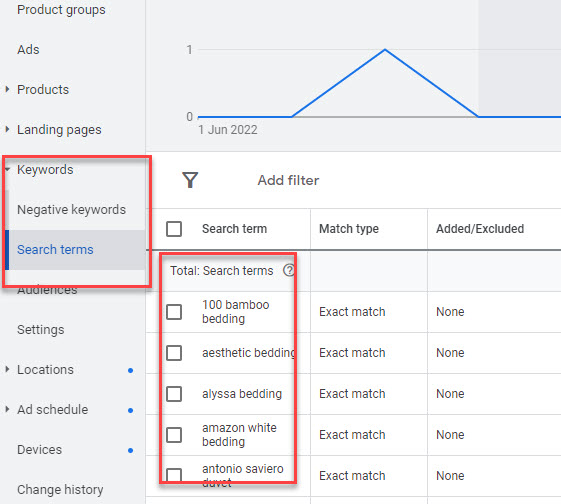
- Discover new keywords – this report also presents opportunities for new keywords to add in your campaigns. And adding them helps you to control them and bid effectively to reach your audiences.
- Identify search terms that are generating conversions – check these out and see how much traffic you are getting for them and how you can boost performance, like increasing budget at the campaign level, and adding them as keywords to bid higher.
Review keyword performance
- Check keywords generating clicks but not conversions – do an analysis of your keywords to see what conversions you are getting. If some are getting high clicks, like over 100 per week but have no conversions, you need to investigate and potentially pause them.
- Review keywords generating clicks but no sales or leads – it’s important to check this at both the search term and keyword levels. This will help you identify wasted spend, and then focus on the keywords that are generating leads or sales for your business.
- Review Quality Scores – your scores reveal how well your keywords and ads are performing. The higher the better but reaching 10/10 for each keyword is not always possible, but getting close to that is important by improving your landing pages and ad targeting.
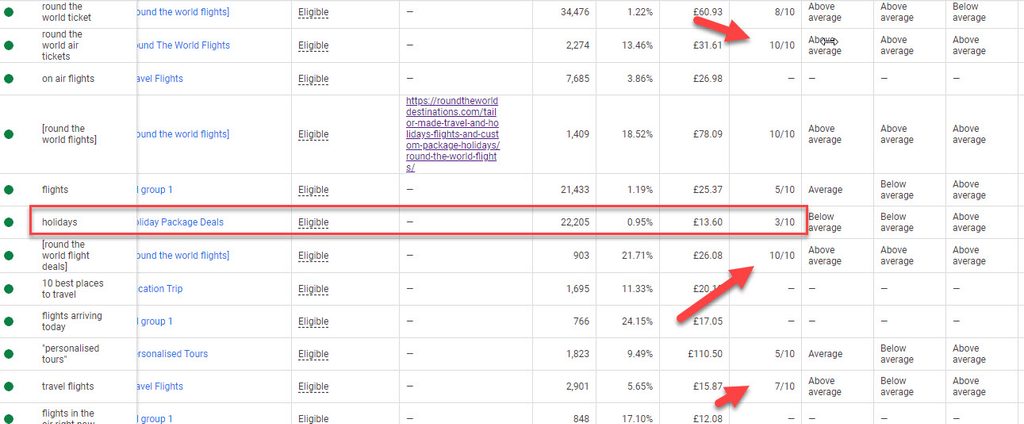
- Check keywords with high CPCs – a high cost per click is not always a bad thing, especially if the keyword is profitable. But reviewing your CPCs helps you identify any that are overpaying, and that will help you to adjust your spend.
Review ad performance
- Are you using all headlines and description lines – though not always necessary to achieve good results, it’s still good practice to use them as long as they are relevant. This helps the algorithm combine the best ads when they appear on Google.
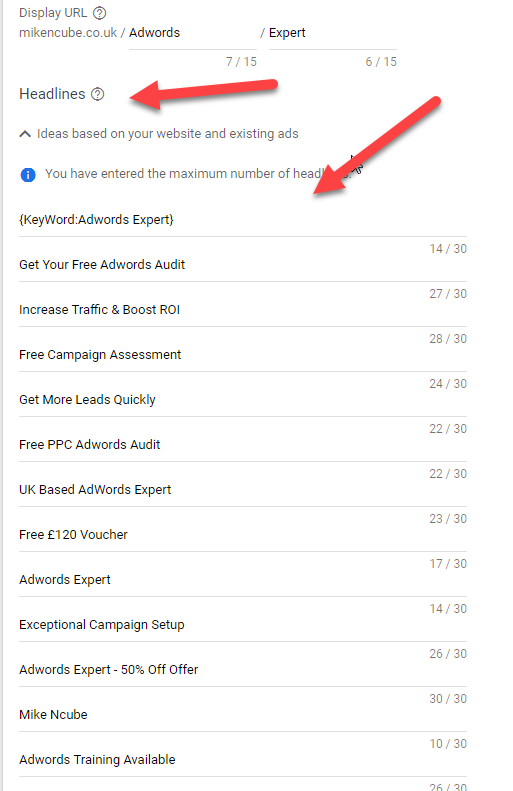
- Review deadlines and descriptions – check that you are using the correct assets with the right messaging to attract qualified clicks to your website.
- Have keywords been added in the headlines – click through rates are usually higher when keywords have been included. That’s because people are more likely to click your ads when they see their keyword in the headline, and this boosts performance.
- Include a call to action in every responsive search ad – a call to action is the action you want your visitors to take when they get to your website. Whether it’s to buy a product, book a meeting, schedule an appointment etc, make it clear in the ad.
Check conversion tracking
- Confirm that conversion actions are recording correctly – check that the conversions that are recording in your Google Ads account are similar to what you are actually receiving.
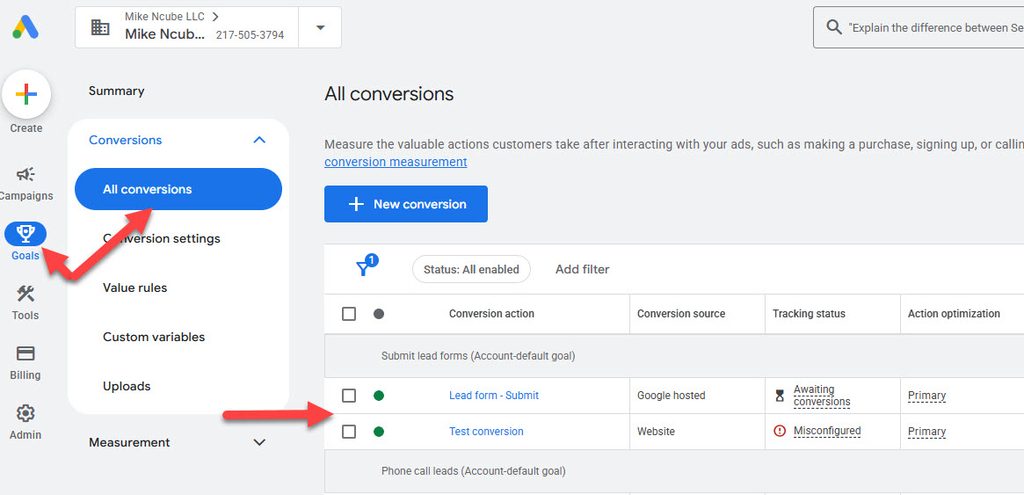
- Look for unexpected changes in conversion volumes – doing this helps you gain insight into how your campaigns are progressing. And if it’s an error with your tracking, then you can take action to fix it.
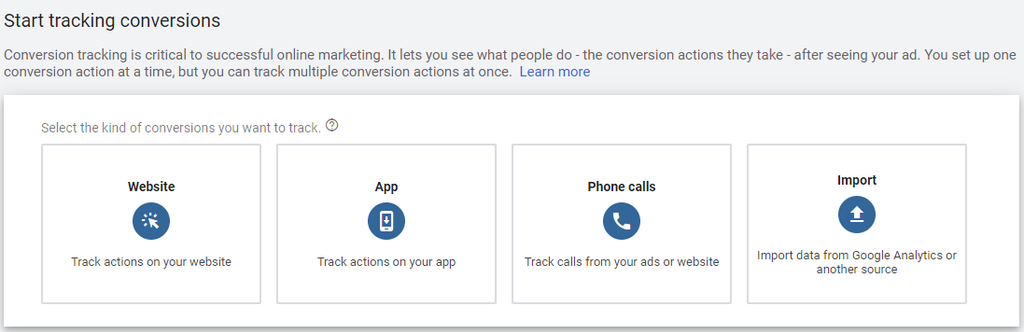
- Track all important actions on your website – track all actions like contact forms, newsletters, purchase forms etc to see how your ads are appearing across all audience types that you are receiving.
Review budgets and bidding strategies
- Check for campaigns limited by budget – if these campaigns are performing well but they are limited because of the budget, then you should consider increasing your spend to get even more of the same results. However, this is not always guaranteed so keep track of performance.
- Check bid strategies learning statuses – when you create a new campaign or change your bid strategy, the bid strategy will go into learning mode. This usually lasts for about 5 days and any time you make a bidding change at the campaign level, the learning mode begins.
- Avoid unnecessary bidding changes that could disrupt optimisation – any changes you make to the bid strategy, usually triggers a new learning phase. And this affects performance because the bid strategy has to learn the new changes.
- Review average daily spend – your weekly Google Ads campaign optimization checklist should include checking how much you are spending per day on average. That will help you see if you are reaching your daily limit and then you can adjust accordingly.
SECTION 2: Monthly Google Ads Campaign Optimization Checklist
The monthly Google Ads campaign optimization checklist focuses on more strategic account improvements rather than routine weekly checks.
Conduct a full campaign performance review
- Compare month-on-month results – this allows you to check how your campaigns are performing month by month for conversions, clicks, impressions, conversion rate and other metrics.
- Check the ‘Overview’ page – get an overall insight on your campaigns to see how they are performing currently and the trends over the last three months.
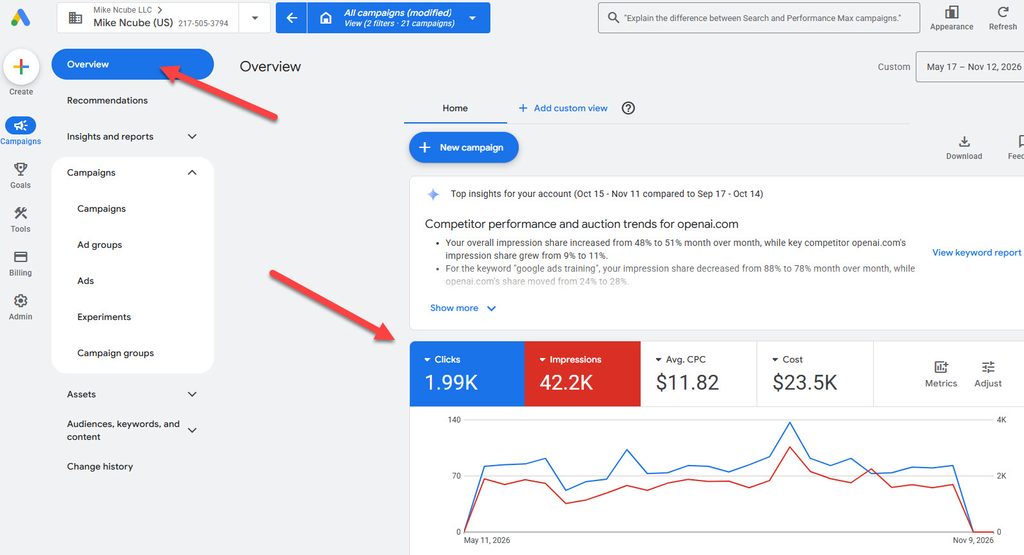
- Identify the best and worst-performing campaigns – each month check which campaigns are working and which aren’t and make adjustments accordingly. And consider adding more budget to the best performing campaigns, by moving it from the less performing campaigns.
Conduct a keyword strategy review
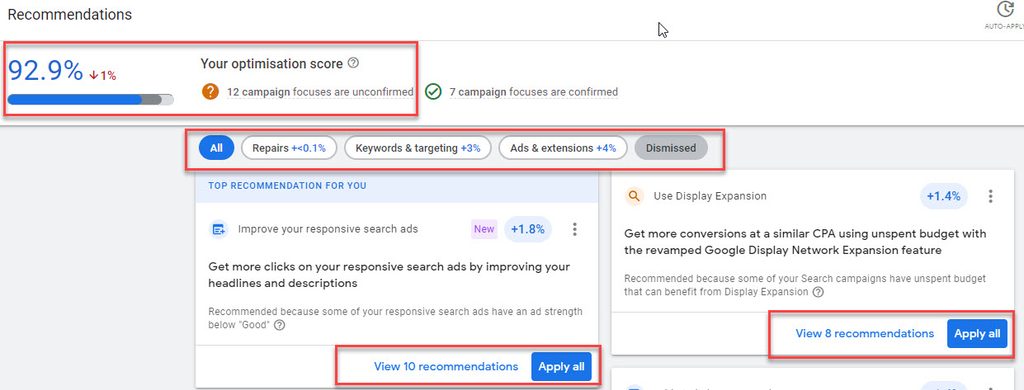
- Identify new keyword opportunities – use the Keyword Planner tool to research more relevant keywords to add in your campaigns. And check the Recommendations page for keyword opportunities. But only add relevant keywords and dismiss any that are not.
- Review keyword match types – check how your match types are performing, whether you’re using broad, phrase or exact match. The search terms report will reveal how they are performing based on the searches you are getting.
- Review brand keywords – if you are bidding on your brand keywords, find out how they are performing and check if there is any keyword cannibalisation if you already appear organically on Google for them. And if you are not bidding on them, consider bidding if you don’t appear organically.
Review audience targeting
- Review audience segments – review the ages, genders and household income that your ads are targeting. And block any that are not performing for your business. For example, if conversions for 25-34 year olds are low, you can remove them at the ad group level. You can also bid higher for audiences that are performing well.
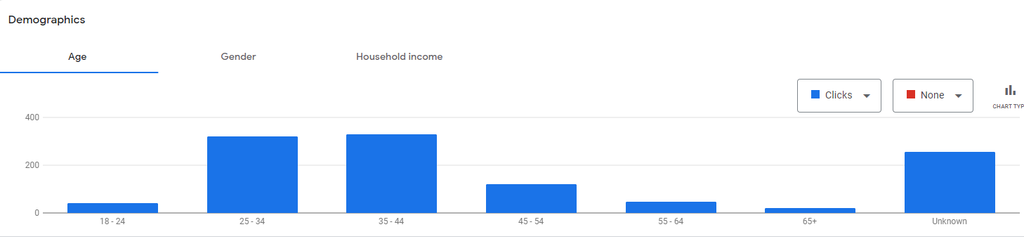
- Assess remarketing performance – check how your ads that are retargeting people who’ve visited your website are performing. If they are not convincing them to convert, then consider pausing and trying other audiences or make adjustments to messaging.
- Review customer match lists – if you are targeting previous customers, check how they are performing for the metrics that are important for your business. Not all lists work well and some will have a low conversion rate.
Review automation and AI-powered campaigns
- Check Performance Max campaign performance – this is an AI campaign type that allows you to target your audiences across Google platforms and websites. It works well for ecommerce businesses, but no so well for service businesses, so review how it is performing each month.
- Review AI Max search terms – You can turn on this feature in your campaign settings to target searches that your keywords are not targeting. But review them each month to make sure they are relevant for your business.
- Check automatically created assets – if you’ve turned on automated assets like sitelinks, callouts and others, then check how they are performing for your campaigns. And make sure they are relevant because the system sometimes creates some that are irrelevant.
- Search campaign broad match and Smart bidding – Google often recommends this combination to help you get the most and best conversions from your campaign. But often the searches are not relevant and the average cost per click (CPC) can be too high especially at the beginning before it has had much time to learn.
- Review whether automation is helping achieve business objectives – Google Ads campaign optimization is most effective when the automation features are helping to achieve business objectives. So, check that the automation controls are working in your favor and not just turned on for the sake of it.
Conductor a competitor review
- Review competitor budgets – use platforms like SERanking to find out what your competitors are spending each month in Google Ads. This helps you determine your budget and you can tweak it to make your ads competitive.
- Check competitor keywords – these same platforms will also reveal the keywords that they are appearing for. You won’t have conversion data for them, but it will reveal new keyword opportunities to add and target.
- Check Auction Insights report – your monthly Google Ads campaign optimization checklist should also include reviewing this report. It reveals what percentage of traffic you are likely getting for your keywords relative to competitors. And you can see how you are ranking in the top positions on Google compared to competitors.
- Check which products or services competitors are promoting – your competitors will have similar products or services, but they may not be promoting all on Google. Check which ones they are advertising and decide from that which ones you should advertise.
Download Free Google Ads Campaign Optimization Checklist for 2027
A Google Ads campaign optimization checklist is important because it helps you to cover all areas that need improvement and not leave out any.
So, I’ve created this 2027 Google Ads campaign optimization checklist document to help you with that process.
>>>Download FREE Google Ads campaign optimization checklist for 2027 here<<<
FAQs
How long does it take to optimize a Google Ads campaign?
Google Ads optimization is an ongoing activity and there is no time limit if you are running campiagns.
However, if you hire a Google Ads expert to optimize your campaigns only, without ongoing Google Ads management, then it usually takes 2-3 days to complete.
But this also depends on the size of the account.
Can you audit my Google Ads account?
Yes I offer a Google Ads audit service. I will need access to your account. Contact me to discuss.
Should I follow Google Ads Recommendations automatically?
Google sends many recommendations in your account each week and month. But many of these are not relevant.
So, check them first before making any changes and dismiss any that are not relevant, and apply the relevant ones.
Doing so will help increase your Optimization score.
How does AI affect Google Ads optimization?
AI is an important part of Google Ads Optimization and there are many tools in your account you can use like AI Max and Performance Max.
And you can test these and see how they perform for your business.
However, some are standard AI and machine capabilities like bidding and search query targeting which the algorithm learns and adapts as you run your ads.
Should I hire a Google Ads Specialist to optimize my campaigns?
Whether you should hire a Google Ads specialist depends on what help you need.
If you have little experience setting up, optimizing or managing Google Ads campaigns, then you should consider hiring one.
Also, if you are having challenges with your campaigns and not sure what the problem is, then it will be important to get some help.
A Google Ads audit will be helpful and a specialist will carry out a comprehensive audit to identify any problems and opportunities to improve your return on ad spend.
What are your Google Ads Optimization fees?
My Google Ads optimization fees depend on several factors including:
– the size of your account and how many campaigns you have
– what your monthly Google advertising budget is
– how many campaigns, keywords, ads etc you would like to setup
– how quickly you would like the work to be done
So, reach out to me to get a free, no-obligation Google Ads optimization quote.
Get in Touch
Are your Google Ads campaigns performing as well as they should?
Contact Mike Ncube for a professional Google Ads account audit.



0 Comments